Wishly: Make a Stunning Wish Website for Birthdays, Love & Surprises
Wishly is a wish website maker for birthdays, proposals, anniversaries and apologies. Take a complete tour of the builder, the guide.wishly.bd advice library and the store.wishly.bd gift catalogue, and learn where to start.
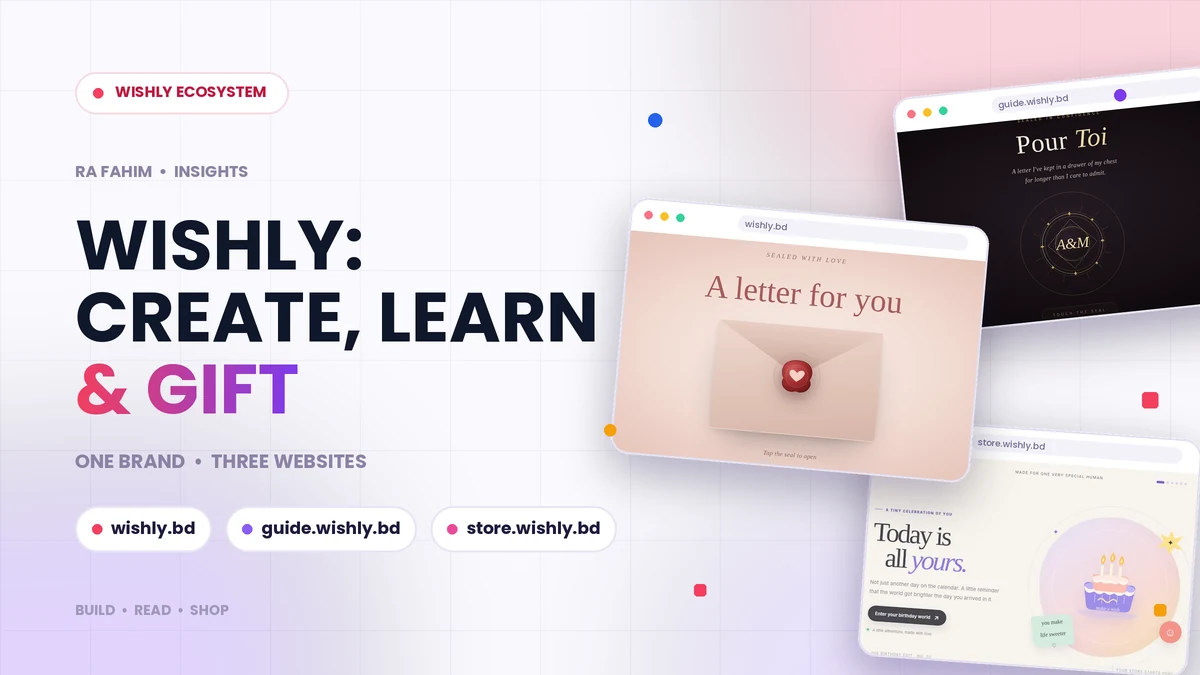
What Wishly is, and why it now has three websites
Most people do not struggle to feel something for a birthday, an anniversary or an apology. They struggle to say it in a way that feels personal. A forwarded text is forgotten in a minute, and a stock greeting card could have been sent to anyone. Wishly was built to close that gap: you turn photos, music and your own words into a private page and share it with one link.
Over time one website was not enough to explain everything around that idea, so Wishly grew into three connected sites with three clear jobs. Wishly is where you create. guide.wishly.bd is where you learn what to write and what to do. store.wishly.bd is the gift and card catalogue. This article walks through all three, so you know exactly which one to open for what you need.
Disclosure: I designed and built all of it. If you want the technical side, the stack and the product decisions are on the Wishly project page.
Wishly: the website maker
The main site, Wishly, is a no-code builder for personal occasion pages. You start from a template that already looks finished rather than from a blank canvas. The template library is organised by occasion: birthday, proposal, wedding, anniversary, miss you, sorry, letter, best friend, friendship, thank you and invitation cards.
Editing is visual. You tap the text you want to change, tap a photo to replace it, and see the result directly on the page. Depending on the template you can add a photo gallery, a video, background music and a private letter. Everything works in English and Bangla, so a heartfelt message in your own language does not turn into broken text.
Each template also keeps its own design settings. You can pick a colour preset or enter a custom HEX colour, choose a font, and the choice is saved only for the template you are editing, so your other pages keep their own look. The full list of capabilities is on the Wishly features page, and the step-by-step walkthrough is on the how-to-make-a-website page.
If none of the ready-made designs fits your idea, there is also a custom template request form where you can describe the page you have in mind.
guide.wishly.bd: ideas, advice and the right words
Having a beautiful page is only half of the job. The other half is knowing what to put on it. That is the reason guide.wishly.bd exists. It is an informational publication, separate from the builder, with practical advice on relationships, communication, friendship, family, meaningful messages and special occasions. It has well over a hundred pages, mostly in English with selected Bengali pages.
The guides are grouped into topics such as love and romance, communication and repair, emotional support, friendship and gratitude, long-distance relationships, special occasions, and personal messages. If you are making something specific, these are good places to begin: what to include on a birthday website, the proposal website guide, the apology website guide, digital love letter ideas and anniversary website ideas.
There are practical product guides too, such as how to change a template’s theme and font and how to share your wish website link. For readers who prefer Bangla, start with the Bangla guide to making a wish website, and browse the video guides if you would rather watch than read. You can also read the story of the developer behind Wishly.
The guide stays deliberately informational. It has no accounts, logins or dashboards, and where it makes sense it simply points readers to Wishly with a normal link.
store.wishly.bd: the gift and card catalogue
Sometimes a personal page is the whole gift, and sometimes you want something to go with it. store.wishly.bd is the storefront side of the project. Its shop is organised into five collections: Wishly Cards, Mystery Gifts, Birthday Gifts, Anniversary Gifts and Friendship Gifts. Each product has its own page with a description, ideas for who it suits, and a clear note about its status.
It is important to be honest about where the store is today: it is currently a product-catalogue preview, not a live checkout. Names, descriptions and images are concepts that set the direction of the storefront, no prices or stock are shown, and no order or payment details are collected. You can save items you like to a local wishlist in your browser, but nothing is synced to an account. Final products, pricing, shipping regions and payment options will be confirmed before ordering opens.
How the three sites fit together
Think of it as a simple journey. You find an idea or the right wording on the guide, you build the page on Wishly, and, once it is live, the store gives you gift ideas that match the occasion. Each site links back to the others, so nobody has to guess where to go next.
Keeping them separate is a deliberate choice. The builder stays focused on creating and publishing, the guide stays a calm, readable library, and the store can grow its own catalogue without cluttering either of them. For readers, that means faster pages and less confusion. For search engines, it means every site has one clear purpose.
Which Wishly site should you open first?
If you already know the occasion and want to make something today, open Wishly, pick a template and start editing. If you are stuck on what to write or what to include, begin with guide.wishly.bd and then come back to the builder. If you are looking for a card or gift idea to pair with your page, browse store.wishly.bd and keep in mind that it is a preview for now.
A good rule for first-timers is to read one short guide, then spend ten minutes in the builder. A thoughtful sentence you wrote yourself will always matter more than a perfect layout.
Behind the build
Wishly is a good example of how I like to work: start with a real problem, build the product, then document it properly so other people can actually use it. If you want to see how the platform came together, read the Wishly case study, or the earlier article on how to make a birthday surprise website without coding.
If you are planning a product, a SaaS dashboard, an e-commerce store or a business website of your own, take a look at my web development services or the page for hiring a web developer in Bangladesh. And if you just want to make someone smile this week, Wishly is ready when you are.
Frequently asked questions
- What is Wishly?
- Wishly is a no-code website maker for personal occasions such as birthdays, proposals, weddings, anniversaries, apologies and letters. You pick a template, add your photos, music and words, and share one link.
- What is the difference between Wishly, guide.wishly.bd and store.wishly.bd?
- Wishly is the builder where you create and publish pages. guide.wishly.bd is an informational guide with ideas, message advice and tutorials. store.wishly.bd is a catalogue of Wishly cards and gift concepts.
- Do I need coding skills to use Wishly?
- No. You choose a template and edit text and photos by tapping them. The editing options depend on the template you pick.
- Can I use Wishly in Bangla?
- Yes. Wishly works in both English and Bangla, and the guide also has selected Bengali pages and a Bangla video guide.
- Can I buy products from store.wishly.bd today?
- Not yet. The store is currently a catalogue preview with concept products. No prices are shown and no orders or payments are collected until the launch is confirmed.
- Does the person who receives a Wishly page need an account?
- No. They only need the link and a browser on a phone or computer. There is nothing to install.